
Mastering PLC Diagnostics: Troubleshooting BF and SF Hardware Faults
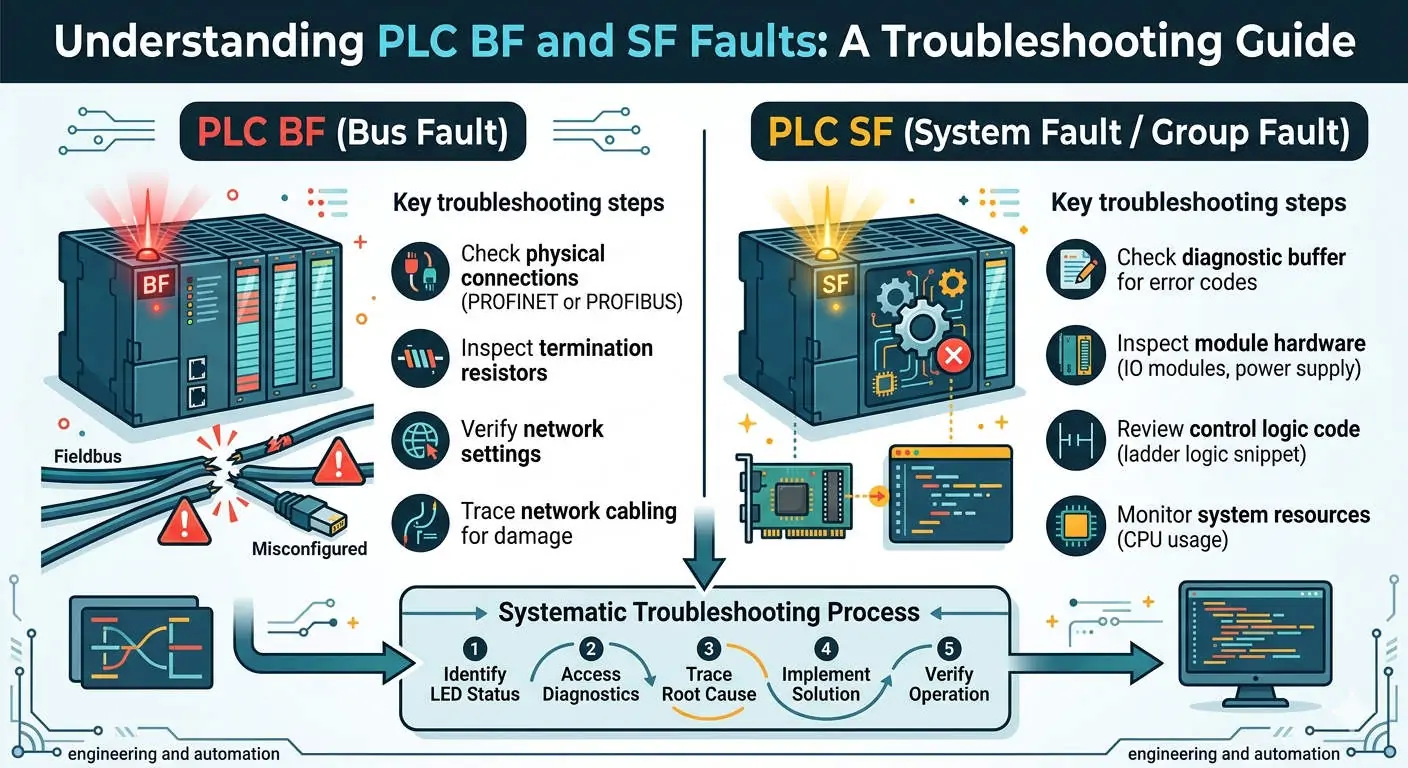
A “hardware self-test fault” occurs when a PLC or DCS module identifies internal errors during its initial power-up. When the System Fault (SF) or Bus Fault (BF) LEDs begin to flash, they signal more than a simple error. These indicators serve as vital warnings that hardware reliability or communication stability may soon fail. In high-stakes environments like chemical or pharmaceutical processing, ignoring these signals often leads to unplanned downtime and compromised data integrity.
Understanding the Critical Nature of Self-Diagnostic Cycles
Modern control systems execute hardware self-checks within milliseconds of startup. This rapid detection ensures that the system identifies faults before the main control logic begins. However, frequent intermittent SF alarms often indicate aging internal components, such as failing capacitors. Therefore, addressing these early warnings prevents unpredictable system crashes. Rapid detection significantly reduces the risk of operating with hidden hardware defects.
Analyzing Bus Faults and Communication Integrity
The BF indicator specifically targets failures within fieldbus networks like PROFINET or PROFIBUS. Common causes include cable damage, duplicate node addresses, or missing termination resistors. A sustained BF condition can freeze actuators in dangerous positions or trigger emergency shutdowns (ESD). Moreover, real-time data exchange relies entirely on these connections. Consequently, maintaining bus integrity is essential for keeping safety interlocks active and production lines running.
Environmental Impacts on Industrial Hardware Reliability
Environmental stress often triggers hardware self-test failures. High ambient temperatures and electromagnetic interference (EMC) accelerate the degradation of delicate circuitry. Furthermore, poor grounding in high-power environments, such as steel mills, can induce phantom SF alarms. For this reason, engineers must ensure that all control cabinets meet IEC 61131-2 standards. Proper shielding and climate control directly extend the operational lifespan of your automation assets.
Essential Maintenance Steps for Control Modules
- ✅ Secure Physical Connections: Thermal expansion or vibration can loosen modules. Always power down the system and reseat modules firmly on the backplane.
- ⚙️ Verify Bus Termination: Ensure the final device on a network segment has its termination resistor enabled to prevent signal reflection.
- 🔧 Implement Surge Protection: Many standard PLCs lack built-in protection. Install external surge suppressors to shield communication lines from voltage spikes.
- ⚡ Audit Cabinet Grounding: Intermittent SF faults frequently stem from inadequate grounding. Re-verify all earth connections during scheduled maintenance.
Strategic Buyer’s Guide for System Upgrades
If a module consistently fails self-tests after power cycles, it has likely reached its end-of-life. Planning a proactive upgrade is more cost-effective than reacting to a total failure. However, you must verify backward compatibility before purchasing new hardware. Some modern modules require updated CPU firmware or newer versions of engineering software. In addition, mixed configurations of old and new modules may require specialized gateway proxies for protocol conversion.
PLC Pioneer Expert Commentary
“In my years of field experience, I have found that 70% of ‘mystery’ SF faults are actually physical connection or grounding issues. While it is tempting to replace the module immediately, a systematic check of the backplane and power quality often saves thousands of dollars. As we move toward more sensitive, high-speed architectures, environmental management becomes just as important as the code you write.” — PLC Pioneer
Frequently Asked Questions
Q: Why does my BF light flash only during system commissioning?
This is typically normal behavior. It indicates that the software expects to see specific nodes that are not yet physically connected or powered. Once you complete the network loop, the light should stabilize.
Q: Can a software bug cause a hardware SF (System Fault) LED to light up?
Generally, no. An SF LED is hardware-specific. However, an I/O configuration mismatch in the software—where the CPU looks for a module that isn’t there—can trigger a system-level fault that appears on the CPU diagnostic buffer.
: How do I distinguish between a temporary glitch and a permanent hardware failure?
Perform a “cold restart” by cycling the power. If the self-test fault persists across three consecutive power cycles, the internal circuitry is likely damaged and the module requires professional repair or replacement.
Solutions for Industrial Reliability
Implementing a robust diagnostic routine transforms BF/SF indicators from annoying alarms into strategic data points. By monitoring these faults, you can schedule maintenance before a catastrophic failure occurs. This proactive approach is the hallmark of modern, high-efficiency factory automation.
For more technical insights or to source high-reliability replacement modules for your control systems, visit our dedicated resource hub.
Explore our full range of industrial solutions at: PLC Pioneer Limited