
Preventing PLC and DCS Program Loss: A Strategic Guide to Control System Reliability
When a PLC or DCS CPU loses its program after a power cycle, the consequences are immediate and severe. Production halts, safety interlocks fail, and recovery times can stretch into hours or days. While many engineers blame a “dead battery,” the root cause often lies in a combination of memory architecture and improper backup strategies. In high-risk industries like chemical processing or pharmaceutical manufacturing, ensuring program retention is critical for maintaining operational stability and regulatory compliance.
The Shift from Volatile RAM to Non-Volatile Flash Memory
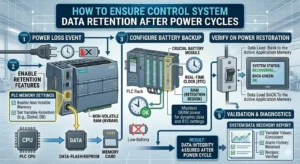
Legacy PLC CPUs often store active logic in volatile RAM. This memory type requires a continuous power source, typically a backup battery, to retain data during a shutdown. If the battery fails, the program disappears when the power cuts. However, modern industrial automation systems increasingly utilize non-volatile Flash or EEPROM technology. These components do not rely on batteries to hold the control logic. As a result, selecting hardware with non-volatile memory significantly lowers the risk of catastrophic data loss during unforeseen power interruptions.
Understanding Battery Voltage Thresholds and Degradation
Backup batteries, usually lithium-based cells, serve as the last line of defense for RAM-dependent systems. Every CPU specifies a minimum retention voltage, often around 2.5V. Unfortunately, engineers frequently overlook the effects of environmental stress on these cells. High ambient temperatures in factory environments accelerate battery chemical depletion. By the time a “Low Battery” alarm triggers, the data retention capability may already be compromised. Therefore, proactive replacement every 12 to 24 months is a far more effective strategy than reactive maintenance.
Load Memory vs. Work Memory: A Critical Distinction
Control systems typically differentiate between “Load Memory” (permanent storage) and “Work Memory” (execution RAM). A common commissioning error involves downloading a program to the Work Memory without committing it to the Load Memory. Consequently, even with a healthy battery, the CPU will reboot to an empty state or an outdated version after a power cycle. Proper use of external memory cards or onboard Flash ensures the system automatically reloads the correct logic upon restart, enhancing overall resilience.
Practical Maintenance Protocols for Field Engineers
Field experience suggests that a disciplined approach to commissioning prevents 90% of program loss incidents. Engineers should always verify the storage location of the control logic before completing a project. In practice, this means manually executing the “Save to ROM” or “Copy to Flash” command in the engineering software. Moreover, always keep a verified, timestamped backup of the program on a secure external server or an engineering station. This redundancy is vital if both the CPU hardware and the battery fail simultaneously.
Strategic Hardware Upgrades for Critical Infrastructure
If your current facility relies on aging, battery-backed hardware, consider a strategic upgrade. Transitioning to CPUs that support IEC 61131-3 standards and offer built-in non-volatile storage provides long-term peace of mind. When evaluating new components, ensure they maintain compatibility with existing communication protocols such as Modbus, Profibus, or EtherNet/IP to avoid integration bottlenecks. Modernizing the control layer is an investment in “zero-downtime” architecture.
PLC Pioneer’s Expert Commentary
“In my years as a field engineer, I have seen too many plants lose days of production over a $10 battery. It is important to realize that technology has evolved. While we must maintain legacy systems with care, the industry is moving toward ‘Set and Forget’ non-volatile storage. If you are still relying on RAM for your most critical safety interlocks, you are essentially gambling with your uptime. My advice: Audit your Load Memory settings today, not after the next power outage.” — PLC Pioneer
Technical Implementation Checklist
- ✅ Verify Storage: Confirm the program resides in Flash or a Memory Card, not just execution RAM.
- ⚙️ Proactive Replacement: Swap backup batteries during planned shutdowns, even if the alarm is not active.
- 🔧 Live Swapping: Always replace batteries while the CPU is powered to maintain the RAM voltage rail.
- 📊 Version Control: Maintain an offline backup on a dedicated engineering station for emergency recovery.
Frequently Asked Questions (FAQ)
Q: Can electrical noise cause program loss if the battery is healthy?
Yes. High-frequency interference or poor grounding can lead to memory corruption. Even with a perfect battery, a corrupted bit in the program header can prevent the CPU from booting, forcing a memory reset. Always ensure proper shielding for communication and power cables.
Q: Why did my CPU lose its program despite having a new battery?
This usually happens because the program was never burned into the non-volatile memory. In many systems, the “Download” button only sends code to the volatile Work Memory. You must perform a secondary “Copy to ROM” action to make the storage permanent.
Q: Is there a way to monitor battery health remotely?
Most modern DCS and PLC systems provide system bits that monitor battery voltage levels. You can map these bits to your SCADA or HMI dashboard. Setting up an early-warning alert at 2.7V allows your team to plan maintenance before the critical 2.5V failure threshold is reached.
Solution Scenario: Chemical Reactor Safety
In a continuous chemical reactor, a power dip caused a legacy PLC to wipe its memory. Because the backup battery had degraded due to heat, the safety interlocks failed to initialize on reboot. By upgrading to a CPU with integrated Flash storage and implementing a 12-month battery rotation, the plant eliminated this risk. The system now recovers to a safe operational state within seconds of power restoration.
For more technical insights and high-performance automation hardware, explore our extensive inventory and expert resources.
Find the right components for your system at: PLC Pioneer Limited