
Troubleshooting DeltaV SE3051C0 Analog Input Card “Bad” Status with Normal Field Signals
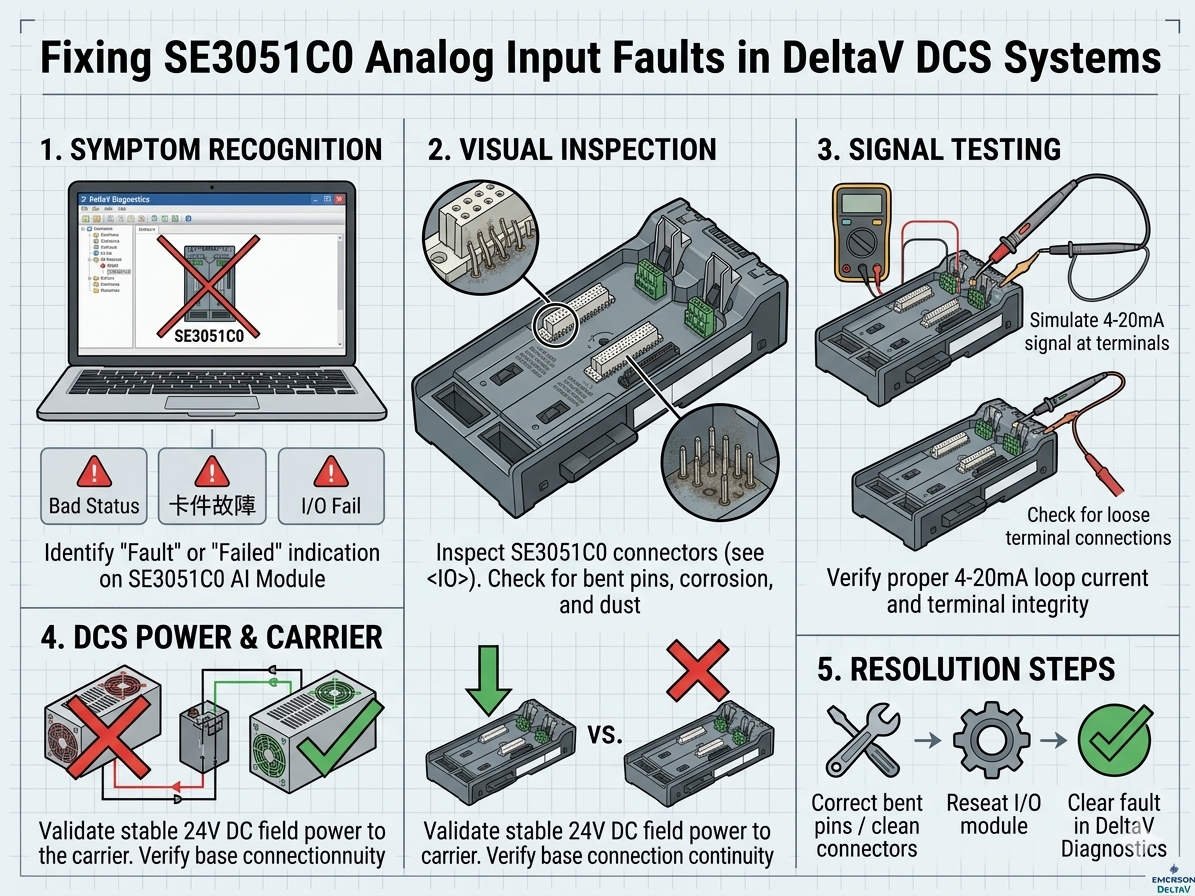
In the world of industrial automation, the Emerson DeltaV SE3051C0 analog input card is a workhorse. It converts critical 4–20 mA field signals into process variables. However, engineers often encounter a frustrating scenario: the channel displays a “Bad” status even when a multimeter confirms a perfect field current. This discrepancy usually points to internal diagnostics, grounding issues, or communication lags within the DCS (Distributed Control System).
Understanding DeltaV Channel Quality and Status Propagation
The SE3051C0 card performs more than simple current measurement. It constantly validates A/D conversion integrity and internal reference voltages. Therefore, a physical 12 mA signal might still report as “Bad” if the I/O bus loses synchronization. PLC Pioneer notes that many technicians waste hours replacing healthy transmitters. Instead, you must distinguish between physical signal health and the electronic health of the I/O subsystem.
Combating Grounding Loops and Common-Mode Noise
Improper grounding often causes intermittent faults in high-interference areas like VFD skids or compressor rooms. Factory automation environments are prone to electromagnetic interference (EMI). While your meter shows stable DC current, high-frequency common-mode noise can destabilize the card’s ADC. Following IEC 61000 standards is vital. Ensure you use single-point grounding to prevent circulating currents from corrupting low-level analog references.
Analyzing Backplane Integrity and Carrier Communication
Aging systems often suffer from oxidation on backplane connectors. In corrosive environments like chemical plants, these microscopic layers of rust increase contact resistance. As a result, the controller fails to validate channel data, triggering a “Bad” or “I/O Timeout” alarm. Before ordering new hardware, always inspect the physical seating of the card in its carrier. Physical vibration in offshore or refinery settings frequently loosens these critical connections.
Maintenance Best Practices: Verification Over Replacement
Proactive maintenance saves significant downtime. Before assuming a card is defective, use the DeltaV Diagnostics Explorer to check error counters. PLC Pioneer recommends a simple “swap test”: move the field loop to a spare channel. If the fault follows the wire, the issue is field-side; if the fault stays at the channel, the card or carrier requires attention. This logical isolation is the hallmark of an expert control systems engineer.
Evaluating External Power Supply Ripple
Switch-mode power supplies can degrade over time, introducing excessive AC ripple into the 24 VDC loop. While a standard handheld meter might average this out, the SE3051C0’s high-speed sampling may perceive this as an unstable input. Use an oscilloscope to verify power quality. For high-precision pharmaceutical applications, using isolated, low-noise power supplies prevents these “ghost” status errors effectively.
—
Expert Troubleshooting Checklist
- ✅ Check Diagnostics: Review the DeltaV Event Chronicle for “Reference Error” or “Communication Timeout” logs.
- ⚙️ Terminal Torque: Re-verify screw tightness on all marshaling terminals to eliminate high-resistance junctions.
- 🔧 Reseat Hardware: Power down the carrier and reseat the AI card to clear oxidation from the pins.
- 📊 Shield Integrity: Confirm that signal shields are grounded only at the cabinet side to avoid ground loops.
—
PLC Pioneer’s Technical Insight
“In my years of field service, I have observed that 70% of SE3051C0 ‘Bad’ status errors result from infrastructure issues rather than component failure. With the industry moving toward Industry 4.0, data integrity is paramount. A ‘Bad’ status is the system’s way of protecting your logic from unreliable data. Treat it as a diagnostic blessing, not just a nuisance alarm.” — PLC Pioneer
Technical FAQ
Q1: Why does my channel flicker between “Good” and “Bad” during motor startup?
This is a classic sign of EMI or poor shield termination. The surge in current from large motors creates a magnetic field that induces noise on your 4-20mA lines. Ensure your analog cables are physically separated from high-voltage power cables.
Q2: Can a firmware mismatch cause the SE3051C0 to report a fault?
Absolutely. In redundant DeltaV architectures, if the primary and standby cards have different firmware revisions, the synchronization might fail. Always verify compatibility in the DeltaV hardware spec sheets before mixing revisions.
Q3: Does the SE3051C0 support HART diagnostics?
While the SE3051C0 handles the analog value, specific HART-capable versions (like the SE3051C1) are required to pass digital HART data to the asset management software. Using a non-HART card with a HART transmitter won’t cause a “Bad” status, but you will lose advanced device diagnostics.
—
Solution Scenario: Chemical Plant Nuisance Trips
A major refinery experienced intermittent shutdowns due to a “Bad” status on a critical pressure loop. Despite replacing the transmitter twice, the issue persisted. After applying our recommended troubleshooting sequence, the team discovered a loose common ground rail in the marshaling cabinet. Re-torquing the ground lugs and reseating the SE3051C0 card permanently resolved the issue, saving the plant from a potential $50,000 unscheduled outage.
For more technical deep-dives or to source genuine Emerson DeltaV components, please explore our extensive knowledge base at PLC Pioneer Limited.