
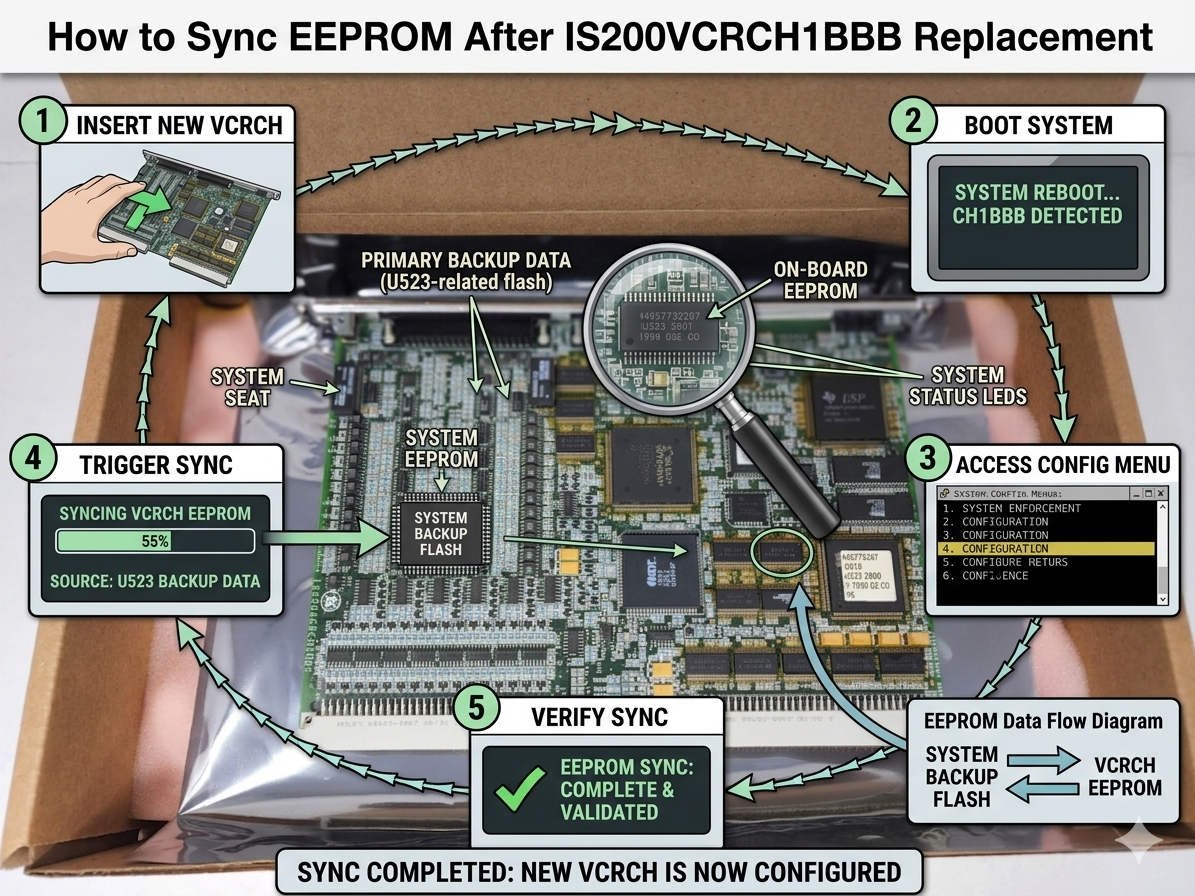
How to Synchronize EEPROM Parameters After Replacing an IS200VCRCH1BBB Board
Replacing an IS200VCRCH1BBB core control board inside GE EX2100 or Mark VI/VIe excitation systems involves precise technical execution. Technicians must properly restore the original Electrically Erasable Programmable Read-Only Memory (EEPROM) configurations during hardware swaps. Failing to align this specific hardware-level data can instantly compromise the integrity of your factory automation architecture.
In addition, incorrect EEPROM synchronization frequently triggers severe operating complications across continuous-process industrial facilities. Maintenance teams regularly report failing startup interlocks, uncalibrated analog scaling, and critical redundancy synchronization loss. These errors eventually manifest as unexpected turbine trip events, resulting in costly unscheduled downtime for power plants and refineries.
Understanding the Core Value of the IS200VCRCH1BBB Control Interface
The IS200VCRCH1BBB serves as a vital communication and processing bridge within GE’s heavy-duty turbine control systems. Consequently, this specific controller governs critical parameters like I/O scaling formulas, safety thresholds, and local device network paths. When swapping boards, EEPROM replication forces the new hardware to inherit the exact technical identity of your existing control systems.
Moreover, modern digital control systems depend heavily on precise timing coordination during sudden load transitions. A replacement board running factory-default EEPROM values cannot communicate efficiently with the plant-wide Distributed Control System (DCS). Therefore, plant engineers must maintain absolute software consistency to prevent hidden protection discrepancies during black-start procedures.
Technical Insight 1: EEPROM Configuration Integrity and System Startup Reliability
The physical EEPROM chip hosts non-volatile data, including custom calibration constants, hardware revision IDs, and unique firmware compatibility maps. When utilizing the GE Control System Toolbox (ToolboxST) utility, field engineers must verify all source baseline parameters. The source software image must match both the specific physical board suffix and the running system firmware package.
However, loading an incompatible memory file can trigger systemic failures across the internal control loop. The primary controller will immediately generate configuration mismatch errors, invalid checksum faults, and IONET communication breakdown alarms. In redundant configurations, these minor parameters directly dictate your controller failover response times during emergency events.
Technical Insight 2: Managing Hardware Suffix and Firmware Package Variations
Industrial technicians often overlook minor hardware suffix modifications, specifically comparing revisions like H1BBA, H1BBB, and H1BBC. Nevertheless, these trailing alphanumeric changes indicate critical hardware updates, such as altered Field Programmable Gate Array (FPGA) logic. These subtle variations change memory write speeds, bootloader sequencing, and internal watchdog monitoring behaviors.
Therefore, I always recommend verifying the entire control software environment before performing an EEPROM burn procedure. Engineers should audit the active ToolboxST project revision, the baseline firmware versions, and the core controller BIOS. In petrochemical plants, even microsecond variations in excitation timing can disrupt anti-surge coordination for massive gas compressor trains.
Technical Insight 3: Communications Stability Across High-Speed IONET Redundancy Layers
The VCRC card acts as an active participant within GE’s proprietary high-speed internal controller network. EEPROM data establishes the network node addresses and assigns specific primary or secondary backup tracking roles. Consequently, corrupted or unaligned parameters will induce random data packet drops and intermittent controller desynchronization.
Based on extensive field analysis at PLC Pioneer, these critical network anomalies frequently remain dormant during initial testing. They typically surface only after the machine undergoes thermal cycling or when the generator reaches full baseload capacity. Experienced engineers must run cold restarts, warm restarts, and active I/O verification loops under real operating conditions.
Step-by-Step Installation and Maintenance Guide for Hardware Replacement
- ✅ Execute Comprehensive Backups: Always extract and save the native EEPROM binary file from the damaged board via a dedicated burn tool before extraction.
- ⚙️ Isolate Active Control Loops: Place your targeted unit into offline maintenance mode and disable automatic redundancy switching before writing data.
- 🔧 Validate Specific Suffixes: Compare part numbers, firmware packages, and PCB revision numbers between the old and new hardware.
- 📊 Run Post-Burn Diagnostics: Perform full dynamic calibration tests and verify application checksum matching values prior to restarting production lines.
PLC Pioneer’s Expert Commentary on Modern Excitation Maintenance
“In the current industrial automation sector, treating circuit board replacement as a basic plug-and-play task invites operational disaster. At PLC Pioneer, we observe that many transient, difficult-to-track alarms stem directly from poor configuration practices rather than component wear. In 2026, standardizing configuration management workflows is essential for safeguarding capital-intensive power generation assets.” — PLC Pioneer
Frequently Asked Questions
Q: What specific hardware symptoms indicate a failed or corrupted parameter synchronization process?
A: The most immediate sign is the system controller refusing to enter RUN mode after a reboot cycle. Furthermore, look for permanent hardware configuration mismatch faults and abnormal signal fluctuations on your local Human-Machine Interface (HMI) screens.
Q: How do environmental factors like continuous cabinet vibration affect these non-volatile memory components?
A: Constant structural vibration can loosen daughterboard seating and accelerate pin oxidation on internal edge connectors. These issues mimic data corruption errors, meaning technicians should inspect mechanical seating and apply contact cleaner before attempting software burns.
Q: Why is reliance on general project backup files insufficient during an emergency board swap?
A: Standard software project files contain the overarching logic but often omit fine-tuned, board-specific factory calibration constants. Writing data directly from the physical chip ensures the replacement module correctly interprets local analog voltages and field sensor offsets.
Practical Solution Scenario: Gas Turbine Excitation Restoration
Consider a combined-cycle power station experiencing a sudden VCRC interface failure on a main gas turbine unit. A replacement board was quickly installed but initially booted with default factory firmware parameters, causing immediate startup blockages. By leveraging the specific cloning procedures detailed above, engineers successfully extracted the local calibration data from the legacy chip. After deploying the verified image offline, the network synchronized seamlessly, restoring the turbine to the grid ahead of peak demand windows.
If you need to source high-performance industrial control components or require certified technical documentation for your ongoing maintenance routines, explore our specialized automation repository.
Visit our official resource center for technical guides and hardware support: PLC Pioneer Limited