
Strategic Guide: Managing the Battery Alarm on Mitsubishi FX2N-48MT-001 PLC
The battery alarm on a Mitsubishi FX2N-48MT-001 PLC acts as a critical heartbeat monitor for your machine’s intelligence. When this LED illuminates, it signals that the internal backup voltage is nearing its lower threshold. In industrial automation environments like packaging or discrete manufacturing, ignoring this warning can lead to catastrophic logic loss and expensive re-commissioning costs. Consequently, understanding the proactive steps for maintenance is vital for ensuring continuous factory automation uptime.
The Mechanics of SRAM Data Retention and Logic Safety
The FX2N series utilizes battery-backed SRAM (Static Random Access Memory) to preserve user programs and system parameters. Unlike modern Flash-based controllers, SRAM requires a constant voltage to maintain its data state. Therefore, if the battery fails while the power is off, the PLC will lose its entire memory. However, an important engineering note from my experience at PLC Pioneer: as long as the PLC remains powered “ON,” the program stays resident in the processor even if the battery is completely dead.
Thermal Impact on Battery Life and Voltage Thresholds
Mitsubishi designs the diagnostic circuit to trigger an early warning, typically providing a maintenance window of several weeks. Nevertheless, external factors can drastically shorten this period. In high-temperature electrical panels (exceeding 40°C), lithium battery chemistry degrades much faster than standard datasheet predictions. Field engineers should treat the alarm as an urgent task rather than a routine one to avoid unexpected data corruption during a weekend power shutdown.
Protecting Retentive Registers and Critical Recipe Data
Modern control systems rely heavily on retentive ranges for D-registers and M-bits. These areas store production counters, calibration offsets, and specific machine recipes. A sudden loss of battery power resets these values to zero. In addition to hardware maintenance, we recommend performing regular software backups via GX Works2. This ensures that even in a worst-case scenario, you can restore the factory-calibrated state within minutes.
Industry-Proven Battery Replacement Procedure
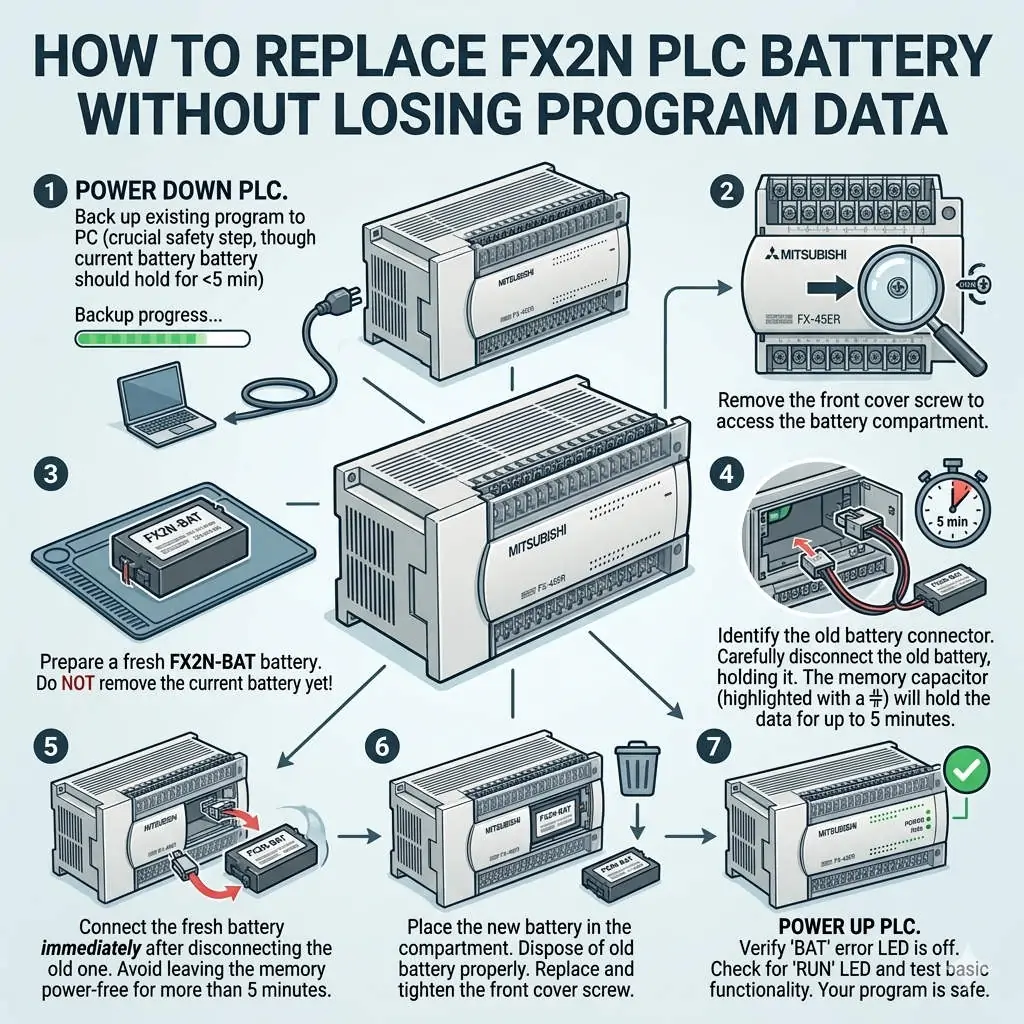
Replacing a PLC battery is a high-stakes task that requires precision to prevent data erasure. Follow these field-proven steps to ensure a safe transition:
- ✅ Maintain Power: Keep the PLC main power supply energized during the entire replacement process.
- ⚙️ Static Protection: Handle the new FX2N-BAT unit by the casing to avoid ESD (Electrostatic Discharge) damage.
- 🔧 Quick Swap: Disconnect the old plug-type connector and immediately seat the new battery.
- 📊 Verification: Observe the “BATT.V” LED; it should extinguish immediately upon successful installation.
Professional Site Recommendations for Harsh Environments
In heavy-vibration sectors like stamping or metalworking, physical stability is as important as electrical health. We suggest securing the battery lead with small cable ties to prevent intermittent contact. Furthermore, always source genuine Mitsubishi-compatible lithium batteries. Third-party alternatives often exhibit unstable discharge curves, which may cause the PLC to skip the “early warning” phase and go straight to memory failure.
PLC Pioneer’s Expert Commentary
“Many field engineers overlook the battery alarm, assuming the internal capacitors will hold the charge long enough for a quick fix. However, in the aging FX2N fleet, capacitor reliability can vary. At PLC Pioneer, we view the battery alarm not as a fault, but as a predictive maintenance gift. If your systems are over 10 years old, it may be time to discuss a migration strategy to the FX5U series, which offers battery-less permanent program storage via Flash memory.” — PLC Pioneer
Frequently Asked Questions (FAQ)
Q: I replaced the battery but the BATT.V light is still on. Why?
This often occurs if the internal diagnostic register hasn’t reset or if the replacement battery voltage is below 2.5V. Check the battery date code; “new” batteries sitting in storage for years can self-discharge. If the voltage is correct, cycle the PLC power once to clear the diagnostic latch.
Q: Can I use an external EEPROM memory cassette to skip battery maintenance?
While an FX2N-ROM cassette preserves the program logic permanently, it does NOT back up your D-register data (counters/recipes). You still need a healthy battery to retain the dynamic machine state during power-down cycles.
Q: How often should I proactively replace batteries before an alarm appears?
The industry standard for a clean, room-temperature environment is 3 to 5 years. However, for mission-critical packaging lines, we recommend a 2-year replacement cycle. This proactive approach is significantly cheaper than a single hour of unplanned downtime.
Solution Scenario: Standalone Machine Recovery
In a recent case involving a standalone packaging machine, a depleted battery led to a complete loss of the PLC’s timing parameters. By having a pre-verified backup on a laptop and following the “Hot-Swap” procedure, the maintenance team restored the machine in under 20 minutes. Without these professional protocols, the factory would have faced days of manual re-programming.
Proper PLC maintenance is the foundation of a resilient shop floor. If you require genuine replacement parts or expert advice on legacy Mitsubishi systems, our technical team is ready to assist with high-availability solutions.
Explore our technical inventory and automation resources here: PLC Pioneer Limited