Step-by-Step Guide: How to Safely Hot-Swap a Bently Nevada 3500/42M Module Without Process Interruption
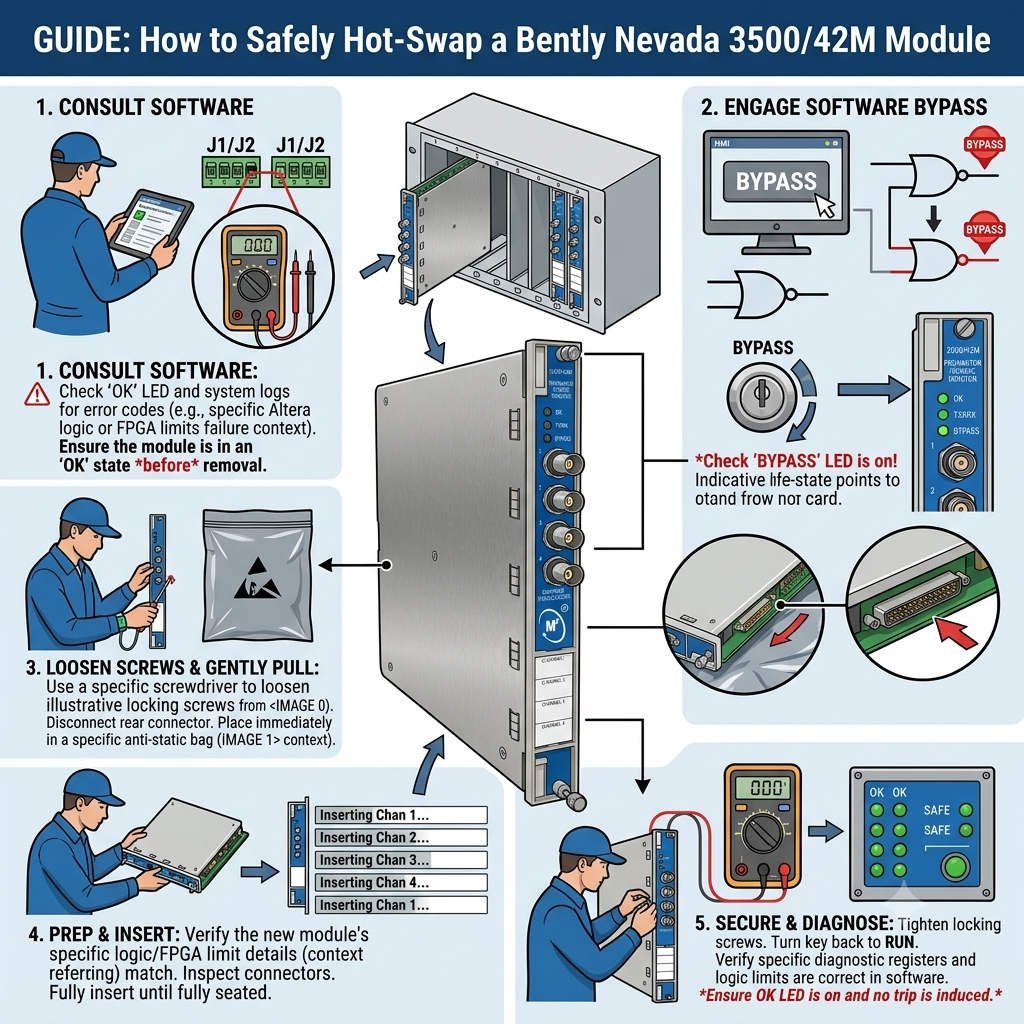
The Bently Nevada 3500/42M Proximitor Seismic Monitor ensures the continuous protection of critical rotating machinery like turbines and compressors. Because it features a hot-swappable architecture, technicians can replace a faulty module while the system remains live. Consequently, plants can maintain full machinery protection coverage and avoid catastrophic unscheduled downtime.
Maximizing Plant Uptime via Hot-Swappable Control Systems Architecture
Unplanned shutdowns in oil & gas refineries or power generation facilities can cost hundreds of thousands of dollars per hour. Fortunately, the Bently Nevada 3500 platform isolates backplane communications to enable safe, online hardware replacements. This capability ensures that your distributed control systems (DCS) and programmable logic controllers (PLC) receive uninterrupted condition monitoring data during maintenance.
Technical Nuances of Live Machinery Protection System Maintenance
Many junior instrumentation engineers mistakenly assume that “hot-swappable” means a procedure is entirely risk-free. However, pulling the wrong monitor module can instantly trip a critical machine if the alarm voting logic is active. Therefore, you must always audit the active configuration profile before physically touching the rack hardware on the factory floor.
Preserving Channel Configuration Integrity and Data Accuracy
The 3500/42M processes highly precise dynamic signals from proximity probes, seismic transducers, and Keyphasor velocity sensors. Because firmware mismatches between the rack backplane and the new module can cause communication blocks, checking compatibility is critical. Always utilize the latest 3500 Rack Configuration Software to back up your parameter profiles prior to module extraction.
Eliminating Ghost Alarms: Diagnosing the True Failure Cause
Field experience shows that intermittent faults often stem from loose field terminal connections rather than internal hardware degradation. For instance, high-vibration compressor decks frequently loosen terminal block screws over time. Therefore, we highly recommend verifying wiring integrity and sensor health before condemning a 3500/42M module entirely.
Hardening the System Against Electrical and Environmental Threats
Industrial automation environments expose delicate monitoring hardware to severe voltage fluctuations and transient spikes. While the 3500 rack provides robust isolation, implementing an external uninterruptible power supply (UPS) is vital for the configuration server. Additionally, plants in lightning-prone areas should install dedicated signal surge protectors to safeguard long-distance transducer extension cables.
The Pitfall of Industrial Noise and Alarm Fatigue
A common error during a hasty module replacement is failing to implement proper delay timers for transient signals. Without these buffers, minor pressure fluctuations can trigger nuisance alarms, causing operator fatigue and lowering overall factory automation reliability. Proper SCADA and HMI integration should always focus on delivering clear, actionable alerts rather than a flood of raw data.
—
Live Replacement Checklist & Technical Best Practices
- ✅ Verify the Target: Double-check the precise slot number, channel configuration, and active bypass switches before extraction.
- ⚙️ Implement ESD Control: Always wear a grounded electrostatic discharge wrist strap matching IEC 61340 guidelines to protect components.
- 🔧 Secure Physical Links: Inspect terminal assemblies for mechanical wear and secure proper cable strain relief upon reassembly.
- 📊 Execute Post-Install Audits: Compare live vibration readings and trend data against archived baseline parameters immediately.
—
PLC Pioneer’s Expert Commentary
“In my years optimizing plant asset safety, I have found that the biggest risk during an online hot-swap is human error, not hardware failure. In 2026, as industrial control systems lean closer to total cloud integration and Unified Namespaces, clean edge data is paramount. Treat your 3500/42M monitors as the gatekeepers of your mechanical truth; never rush a firmware synchronization or skip configuration backups.” — PLC Pioneer
Live Maintenance Frequently Asked Questions
Q: What should I do if the new module displays a steady red “Not Configured” LED after insertion?
This indicates the module lacks the specific parameter profile of the slot. You must connect your laptop via the 3500 Rack Configuration Software, open the verified backup file, and perform a direct configuration download to the new hardware.
Q: How do we prevent a trip if the monitor utilizes a 1-out-of-2 (1Oo2) alarm voting logic?
Before removing the module, you must manually place the associated channels into “Bypass” mode via the software or the physical rack key switch. This action temporarily suppresses the relay trip outputs while preserving upstream monitoring data.
Q: Can a failing 3500/42M module negatively impact adjacent cards or power supplies?
No. The proprietary internal bus architecture of Bently Nevada provides individual slot power limiting. An internal short circuit on one monitor card will trip its local fuse without disrupting the remaining control systems hardware.
—
Application Scenario: The Refinery Turbo-Expander Recovery
Consider a large petrochemical refinery where a 3500/42M module monitoring a turbo-expander began showing irregular internal diagnostic faults. Instead of initiating a full plant shutdown, the maintenance crew applied the bypass controls, extracted the card under full ESD protection, and inserted a pre-tested replacement. The entire process took under 15 minutes, preserving production uptime and saving an estimated $250,000 in potential losses.
If you need to stock reliable replacement spares or require high-performance hardware to optimize your current plant assets, explore our comprehensive inventory of premium industrial components.
Visit our official resource center for technical guides and hardware support: PLC Pioneer Limited